
DreamDiner's POS
The operational center of your restaurant.
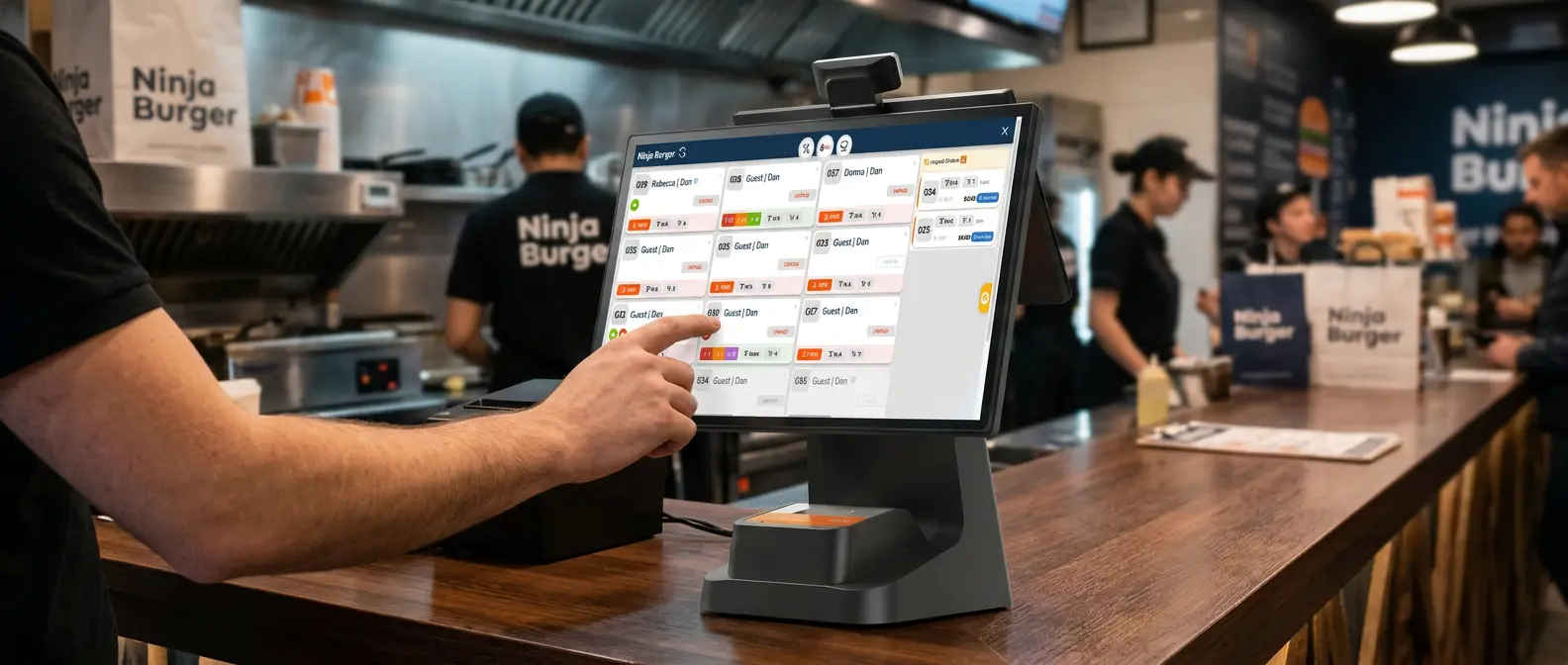
A Point of Sale (POS) system is where your staff manage customer orders and coordinate the daily flow of service.
But a modern restaurant POS is far more than a place to punch in an order. It connects every part of your operation — guests, waiters, counter, kitchen, takeaway, delivery and payment — into one organized workflow.
With DreamDiner POS, orders from across your restaurant arrive in one central system where your team can see them, manage them and move them through service.
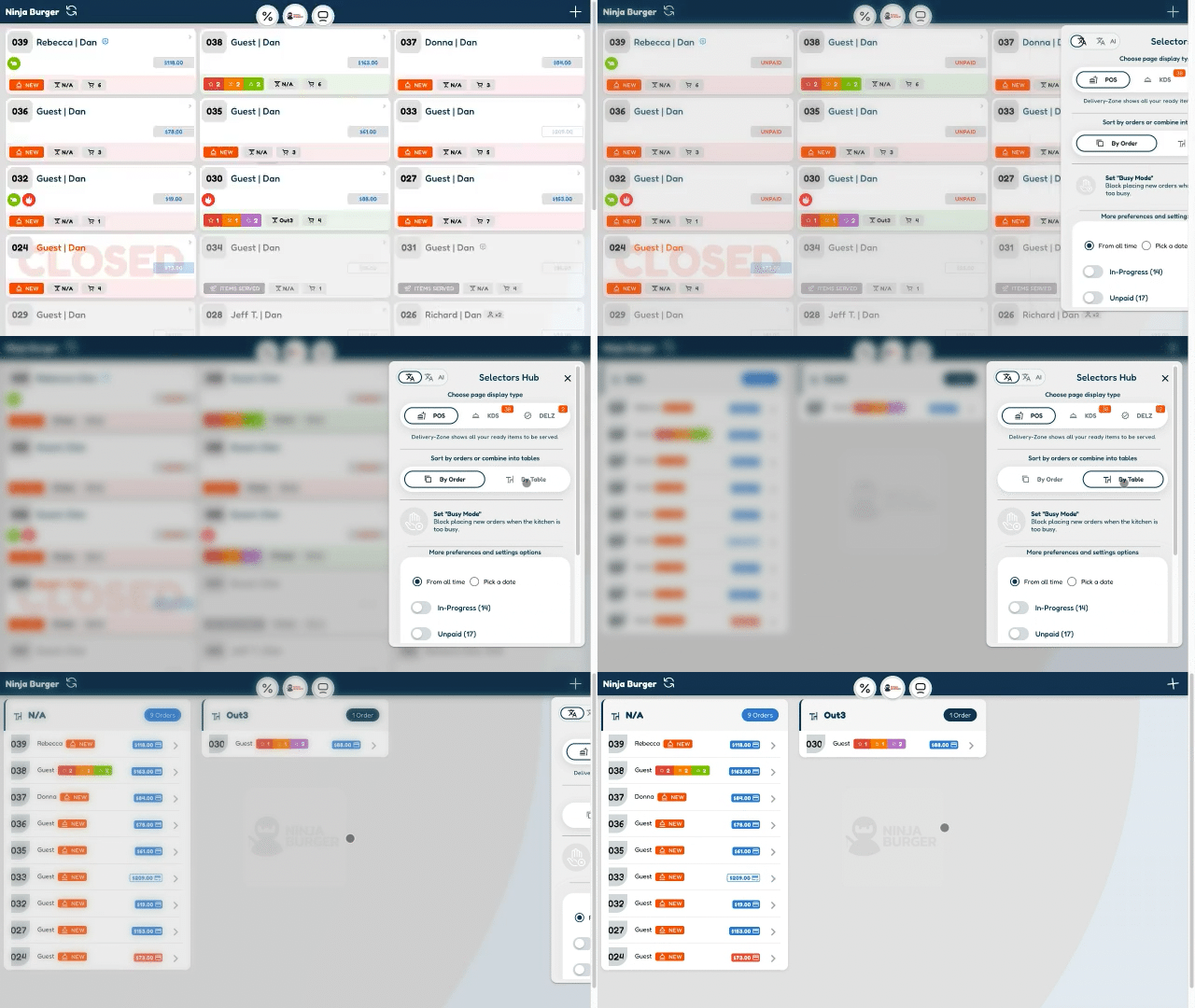
One connected flow — from ordering to fulfillment.
How does DreamDiner POS work?
Picture a busy restaurant at dinner service. Table 12 orders from the DreamDiner digital menu. A waiter enters an order for Table 7. Another guest places a takeaway order. And a delivery order arrives — all at once.
Instead of juggling these separately, DreamDiner brings them into one operational system. Your team instantly sees new orders, where they came from, their details, and what happens next.
One restaurant. Multiple ordering channels. One POS.
Your restaurant at a glance
During a busy service, knowing what's happening is everything. Your team can answer the questions that matter:
- check_circle Which tables have ordered?
- check_circle Which orders are new?
- check_circle What's being prepared?
- check_circle What's ready?
- check_circle Which orders are takeaway?
- check_circle Which guests are waiting?
See the order. See its status. Know what happens next.
Orders can come from anywhere
A modern restaurant doesn't receive orders from only one place. Guests may order:
An order is an order. Once it enters DreamDiner, your team manages it from one place.
From POS straight to the kitchen
This is where DreamDiner POS and DreamDiner KDS become powerful together. Once an order is received, the right information flows straight to the kitchen — no rewriting, no walking across the restaurant to explain it.
In a multi-station kitchen, each item is routed to the right prep area:
DreamDiner POS + DreamDiner KDS = one connected restaurant workflow.
Follow every order, start to finish
An order isn't finished when the guest taps Order — that's when the restaurant's work begins. DreamDiner lets your team follow orders through the whole workflow:
The information follows the order.
Built for table service
For dine-in restaurants, the POS becomes the operational center connecting your tables, staff and kitchen. Guests can order digitally from their table while your team keeps managing service.
You don't have to choose between waiter service and digital ordering — use both. One table orders themselves, then asks a waiter to add something; another orders entirely through staff; another uses the QR menu all meal. DreamDiner lets you build the service model that fits your guests.
Add items without starting over
Guests rarely order everything at once.
New items simply join the ongoing service flow and route to the right station — so guests keep ordering while your restaurant keeps serving.
Give staff the details they need
A restaurant order is more than product names — guests choose sizes, extras, sides, cooking preferences and special requests.
DreamDiner keeps this attached to the order, so whoever prepares and serves it sees exactly what the guest asked for. Less talking, less rewriting, fewer things lost between guest and kitchen.
Dine-in, takeaway & delivery — together
Restaurants increasingly run several businesses from one kitchen: the dining room is busy, takeaway guests arrive, delivery orders need prepping, online orders keep coming. The challenge isn't receiving them — it's managing them together.
Your guests become part of the POS
Traditional POS starts with a staff member entering an order. DreamDiner can start one step earlier — the guest enters it themselves:
The order then enters your operation digitally — eliminating one of the most repetitive steps in service. Your team spends more time helping guests and less time re-entering what guests could enter themselves.
Less waiting for guests
One of the frustrating moments in a restaurant: a guest wants something simple but has to wait for staff — another drink, a side, dessert, coffee, the bill.
With digital ordering, guests can interact with the restaurant without always waiting for someone. Less pressure on staff, a smoother experience for guests — and because it's connected to DreamDiner POS, digital ordering becomes part of the restaurant, not a separate system.
POS & payments
DreamDiner can connect ordering with the payment methods your business supports. Where configured, guests may pay digitally through your connected provider; alternatively, you can handle payment externally and update the order accordingly.
Your business remains responsible for its own payment, accounting, taxation, invoicing and fiscal obligations. DreamDiner is restaurant ordering and operations software — not a fiscal cash register, tax-reporting system, or a substitute for any legally required invoicing or fiscalization solution. Always verify your local requirements first.
Use the hardware that fits your restaurant
A modern POS doesn't have to be a big machine bolted to the counter. DreamDiner works around your restaurant:
Phones, tablets, POS terminals, KDS displays and printers — all part of the same connected workflow. Choose the setup that makes sense for your business.
POS + KDS + Printers
Not every part of a restaurant needs the same device. For example:
- check POS at the counter — manage incoming orders
- check KDS in the main kitchen — manage preparation
- check A second KDS at the grill — grill items
- check A cloud printer at the bar — print drink orders
Another restaurant runs the whole thing on tablets. Technology should adapt to your restaurant — not your restaurant to the technology.
More than a traditional POS
A traditional POS sits inside the restaurant. DreamDiner extends beyond it:
- link Your digital menu connects guests to your products
- link QR ordering connects tables to your restaurant
- link The POS connects staff to incoming orders
- link The KDS connects orders to the kitchen
- link Printers connect individual prep stations
- link Delivery & takeaway join the same flow
Why restaurants move to a connected POS
A modern POS isn't about swapping a paper pad for a touchscreen — it's about a better flow of information. When guests, staff and kitchen work through one connected system, you cut manual steps and everyone sees what's happening.
Make ordering easier. Make operations clearer. Keep service moving.
- check_circle Receive orders from every channel
- check_circle Manage dine-in, takeaway & delivery
- check_circle Send orders straight to the kitchen
- check_circle Route items to prep stations
- check_circle Track order progress
- check_circle Connect POS, KDS & printers
Whether you run a restaurant, café, bar, takeaway, food truck or multi-station kitchen, DreamDiner gives your team one connected platform — from order placed to prepared to served.
Less manual work. Less confusion. Better service. One connected restaurant — powered by DreamDiner.